Guided clinic setup
See live checks for practitioners, treatments, forms and working hours alongside the access, records, connections and rehearsal checks you record as the owner.
The Rytura product tour
Start with a booking. See how the diary, client record, forms, aftercare, payments and business tools support the work that follows.
This interactive illustration uses fictional clinic information. It is a product demonstration, not a signed-in clinic account.
Friday, 18 September
Run-sheet
Example appointments · Fictional clinic information
Friday, 18 September
Your clinic day
Later today
Start in Today, find the next appointment and open the client record. Check current feature availability and setup requirements.
Clinic setup & unfinished work
Prepare your first working day, then keep outstanding clinic work in view. Open the original record, resolve the task and agree a handover when someone else needs to take over.
See live checks for practitioners, treatments, forms and working hours alongside the access, records, connections and rehearsal checks you record as the owner.
Review booking requests, payments, visit status, outstanding forms, unsigned completed-visit notes and due aftercare, within your existing access.
Take ownership of administrative work or request a handover. Responsibility stays with its current owner until the recipient accepts.
Live for existing clinics. Appointment checks cover the previous 90 days through today; aftercare has its own outstanding-work scope. Setup reviews do not activate payment or messaging providers.
The Rytura Client Journey
Booking confirmed. Forms due. Preparation, appointment, aftercare and an agreed review. Give clients one clear place to understand their next step.
See the complete Client JourneyYour care journey
Start with what matters now. Everything else can wait.
Right now · Recover
Explore an example at each stage:
Extended Client Journey: selected-clinic testing. Product layout recreated with fictional information; the controls above switch between examples.
New clinic tool · Aftercare & patient check-ins
Plan the follow-up, agree who owns it and hear back from the patient. Portal replies stay marked for practitioner review, with outstanding work visible to the team.
Set your clinic’s follow-up timing and staff-minute estimates by treatment. Rytura turns booked appointments into a view of the aftercare work ahead.
Publish a clinic-approved question in the secure portal. Patients reply and can request contact. The responsible practitioner reviews the answer before closing the follow-up.
Request cover from a colleague. Responsibility stays with the current owner until the colleague accepts, with completion recorded separately.
Live in the clinic app and secure patient portal. Your clinic approves its questions and publishes each check-in. Alerts are in-app; check-ins do not send email or SMS and are not continuously monitored.
Clinic tool · Treatment journeys
Connect the treatment, its review visits and the goal agreed with your patient. Give clinic owners a clearer view of the work and costs behind that care.
Group related visits, including complimentary reviews. Compare appointment collections after refunds with product, labour and other direct costs.
A practitioner records the agreed goal and approves each shared plan. Patients see it in their secure portal, alongside visits and their check-in replies.
Preserve earlier shared plans as the journey changes. Clinical records, photographs and private staff notes keep their existing access controls.
Costing is an owner-only, partial cash-and-cost view. Estimates and missing figures are identified; it is not net profit. Goals and plans require practitioner approval before patients see them.
Behind the clinic day
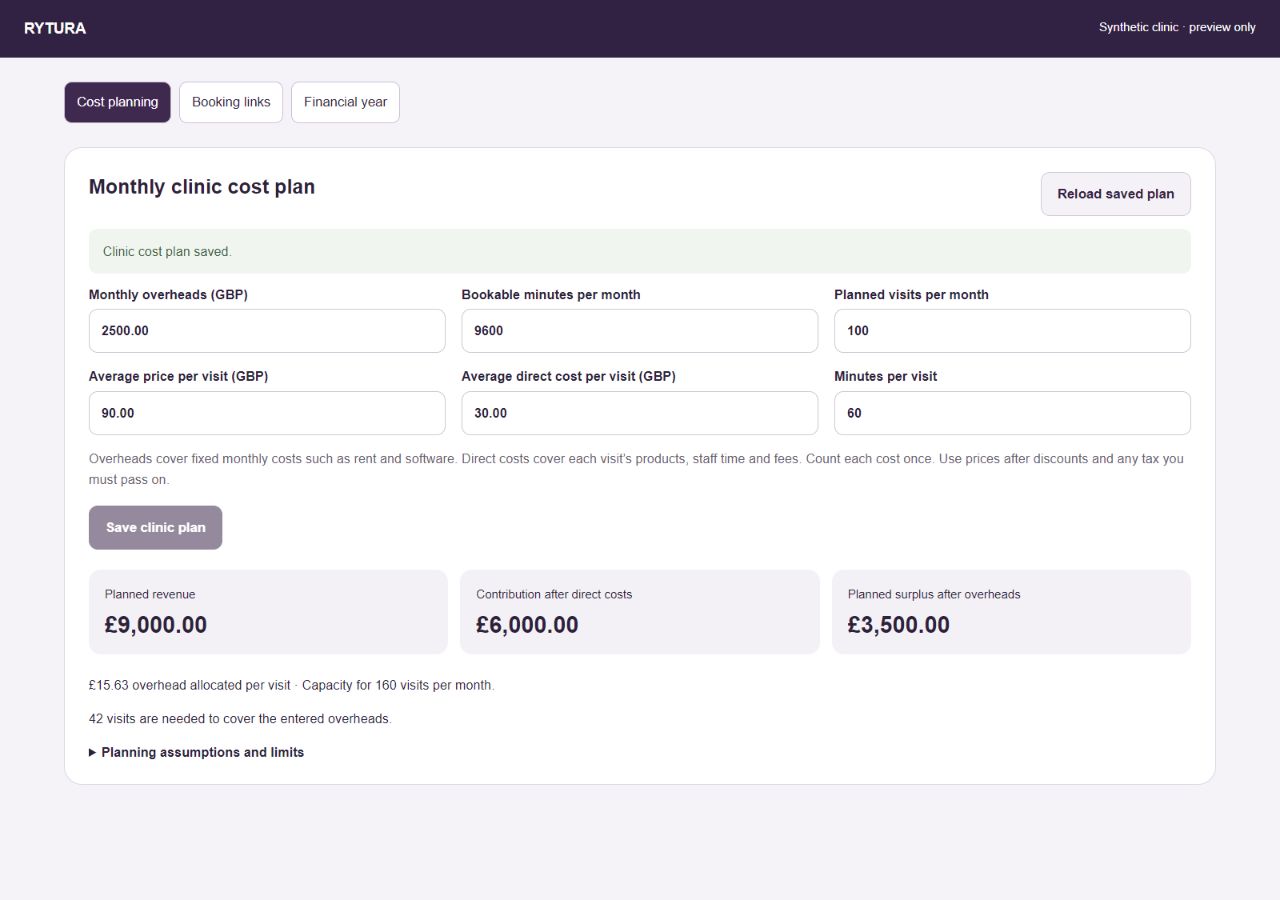
A busy diary tells one part of the story. Add your monthly overheads, available time, planned visits and direct costs to see the plan behind it.
Explore the complete workspace
Start with our aesthetic clinic software overview to see how the whole system fits together. Explore the clinic management workflow and client relationship tools, or choose the part of your clinic you want to improve.
From the first appointment to the next available slot.
Publish treatments and practitioner availability, review booking requests and manage the day.
Explore this workflowReview suitable clients for a cancellation. Optional recovery emails require activation and client opt-in.
Explore this workflowSave named treatment, practitioner and location selections. Archive or restore them and review bookings with matching campaign tags.
Explore this workflowGive returning clients access to appointments, assigned forms and the clinic information approved for sharing.
Explore this workflowKeep the record connected before, during and after a visit.
Find client details, visit history, treatment notes and clinical photographs in the clinic record.
Explore this workflowAssign versioned forms and retain the completed version with the client record. Clinics approve their own content.
Explore this workflowPlan follow-up work, share approved patient goals and review portal check-in replies.
Explore this workflowRecord product use, batch details, expiry dates and stock movements alongside treatment work.
Explore this workflowPlan client contact with clear permission and delivery controls.
Create messages, review eligible recipients, save drafts, schedule sending and follow delivery status. Provider setup applies.
Explore this workflowUpload exported PNG or JPEG designs for email campaigns and keep a link to the Canva original.
Explore this workflowBuild welcome, post-visit and win-back sequences with up to five steps. Review and activate each journey.
Explore this workflowUse configured operational email and SMS, with private portal messaging where the clinic enables it.
Explore this workflowSee collections, client return and the cost of delivering care.
Use eligible payment links, QR and prepayment through your clinic’s Stripe account. Device and provider availability varies.
Explore this workflowReview recorded collections, appointments, repeat visits, rebooking and eligible group aggregates. Save your clinic’s financial-year start.
Explore this workflowSave overheads, capacity, planned visits and average direct costs. Review contribution, planned surplus and break-even visits without confusing a scenario with actual accounts.
Explore this workflowGroup treatment and review visits, collections after refunds and direct costs. Missing values and estimates stay visible.
Explore this workflowManage course balances and optional stamps or points. Confirm paid-course and redemption readiness for your clinic.
Explore this workflowMake access, policies and unfinished work easier to manage.
Keep owner, administrator, reception and practitioner responsibilities clear within each clinic.
Explore this workflowSet treatment-level terms and retain the policy snapshot for new bookings. Record audited deposit decisions.
Explore this workflowReview setup tasks, outstanding administrative work and accepted handovers with links to the original records.
Explore this workflowManage clinic settings and supported connections, with plan and provider costs explained separately.
Explore this workflowA practical starting point, with the boundaries clearly stated.
Search saved reference answers with source links and review dates. This library does not generate AI replies.
Explore this workflowPreview contact CSV imports and separately review historical record CSVs for the client archive. Files, signed consent, live bookings and financial balances need a separate migration assessment.
Explore this workflowCheck what is released, what needs clinic activation and what remains unavailable before planning your rollout.
Explore this workflowAccess follows your clinic role, active plan and configuration. Sending messages and collecting payments require the relevant provider setup. See the full availability register.
Opening soon · 30 days · no card required
Walk through booking, forms, client contact and reporting with the tools your team needs.
Public access opening soon. Join the early-access list.